vLLM 0.14 Walkthrough: Scheduling, Memory Management, and Computation
This is the first part of my walkthrough of the vLLM 0.14 source. It focuses on three things: how requests get scheduled, how the KV Cache is managed, and how that data is finally used during computation.
1. How a request reaches EngineCore
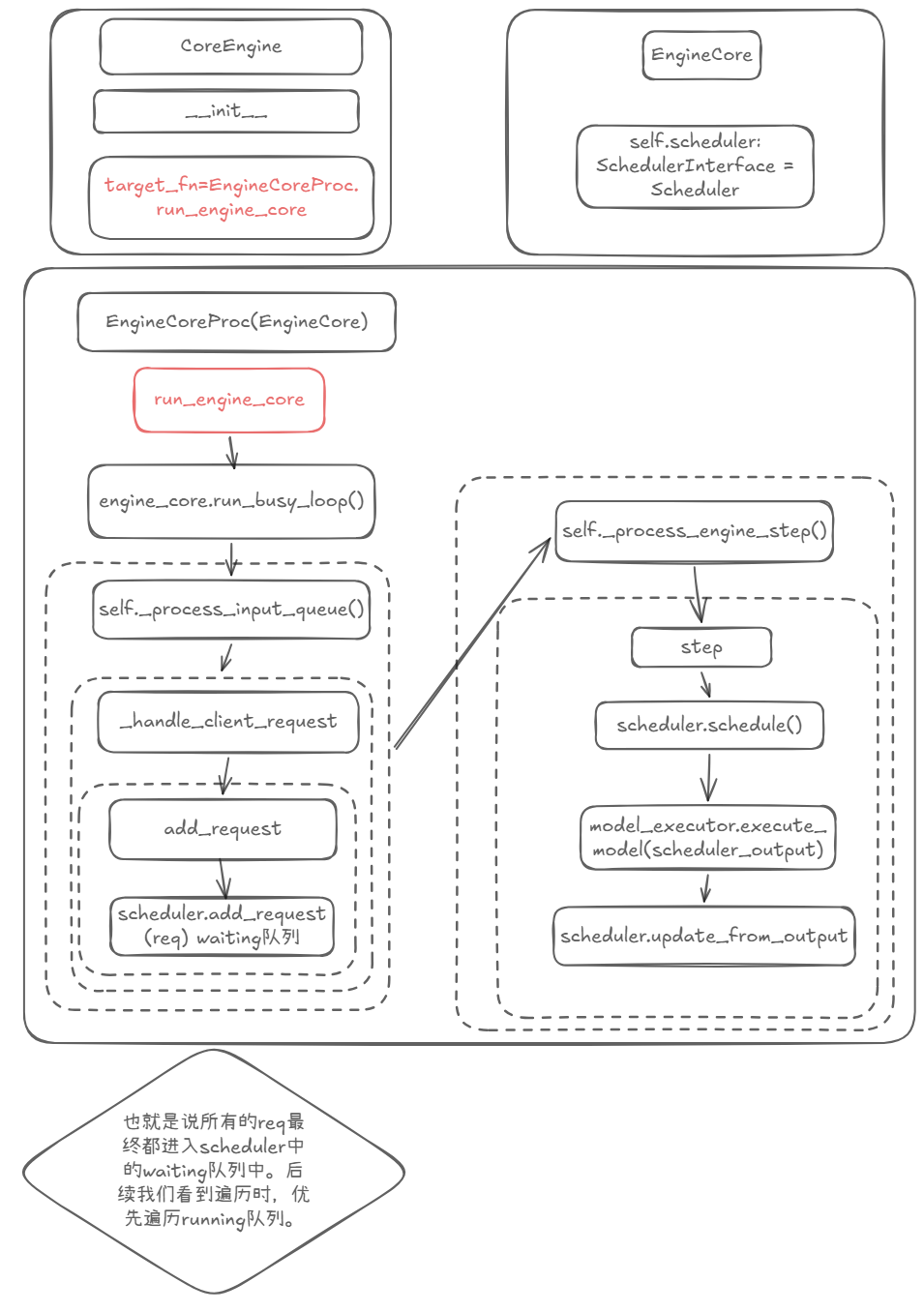
Continuing from the previous chapter: after a req reaches EngineCoreProc, there’s a CoreEngine class whose __init__ calls target_fn = EngineCoreProc.run_engine_core. That function is run_engine_core in EngineCoreProc(EngineCore), and the end result is a call to scheduler.add_request(req), which puts the request into the waiting queue.
Files involved:
core_client.py,core.py
2. What happens in one step
Now for the engine’s step. Every step is:
scheduler.schedule() + model_executor.execute_model(scheduler_output) + scheduler.update_from_output
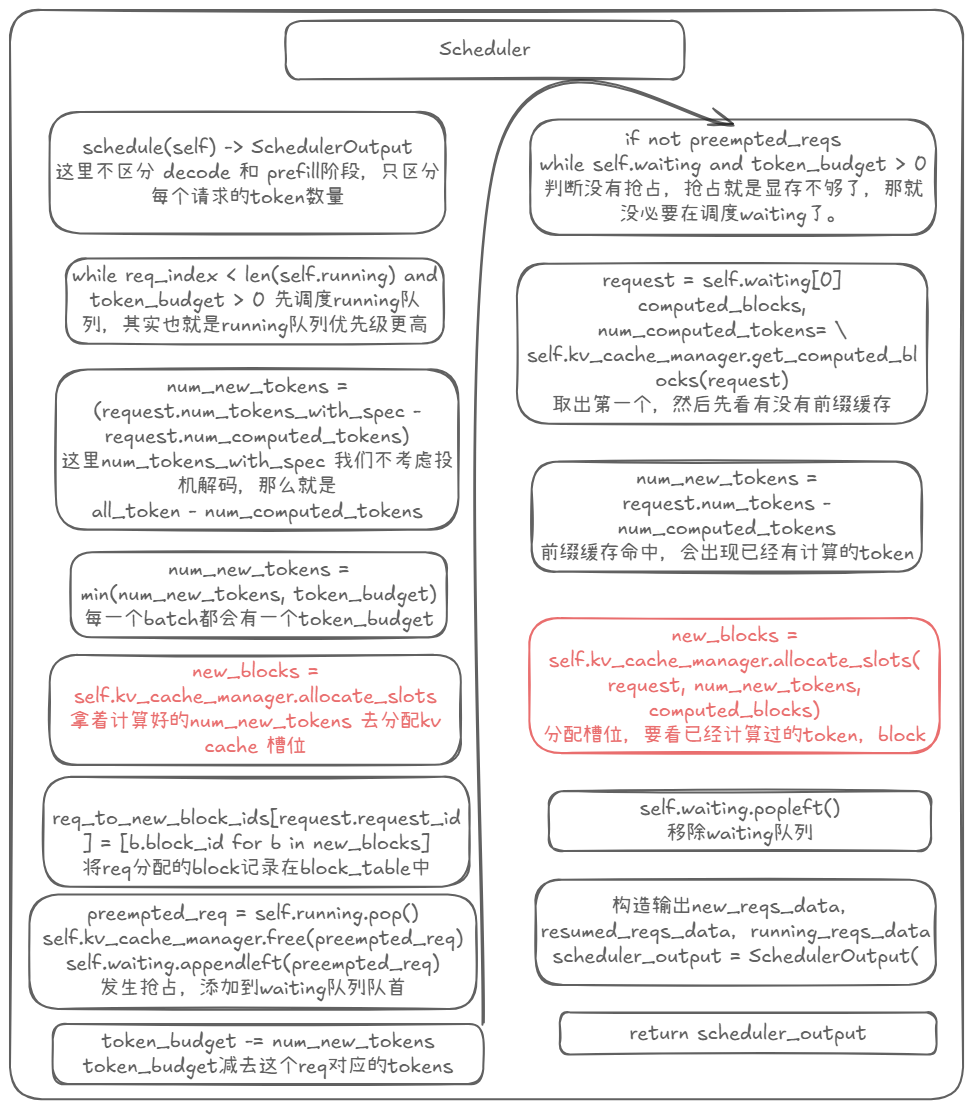
As shown in Figure 2, schedule() is what schedules the two request queues in the Scheduler class: waiting and running. The waiting queue holds requests that haven’t been allocated KV Cache yet (including preempted ones); the running queue holds requests that already have KV Cache allocated.
The running queue is scheduled first (it has higher priority). Take its first request and work out how many new tokens it needs in this step: for decode that’s 1 (assuming speculative decoding is off), for prefill it’s all the prompt’s tokens. Then use the computed num_new_tokens to work out which new blocks to allocate:
new_blocks = self.kv_cache_manager.allocate_slots(...)
The blocks newly allocated for this request are recorded in req_to_new_block_ids — a dict that tracks each request’s blocks for the current step.
If preemption happens while processing the running queue — that is, there isn’t enough GPU memory to allocate new_blocks — the request is pushed to the front of the waiting queue and its blocks are freed.
Once the running queue is done, the waiting queue gets scheduled (provided no preemption occurred; if there was preemption, memory is already tight, so there’s no point scheduling the waiting queue). The process is the same, except that the waiting queue goes through a prefix-matching step: first check whether the token_ids of the requests in the waiting queue match the already-cached blocks exactly. If there’s a match, we can directly reuse the matched block’s KV Cache for computation, and the input becomes the first token of the first non-matching block.
Prefix matching requires not just identical token_ids, but identical hashes (blocks that aren’t full to block_size don’t get a hash). And a block’s hash depends not only on its own token_ids but also on the previous block’s hash. So if the first block doesn’t match, identical token_ids later on are useless. (In “do you like eating apples” vs. “does he like eating apples”, the very first token already differs — everything after it matching doesn’t help.)
After prefix matching, num_new_tokens is again used to compute new_blocks, which are recorded in req_to_new_block_ids. Finally, the waiting, running, and preempted requests are packed up and returned as scheduler_output = SchedulerOutput().
Files involved:
scheduler.py,kv_cache_manager.py
3. Blocks and block_table
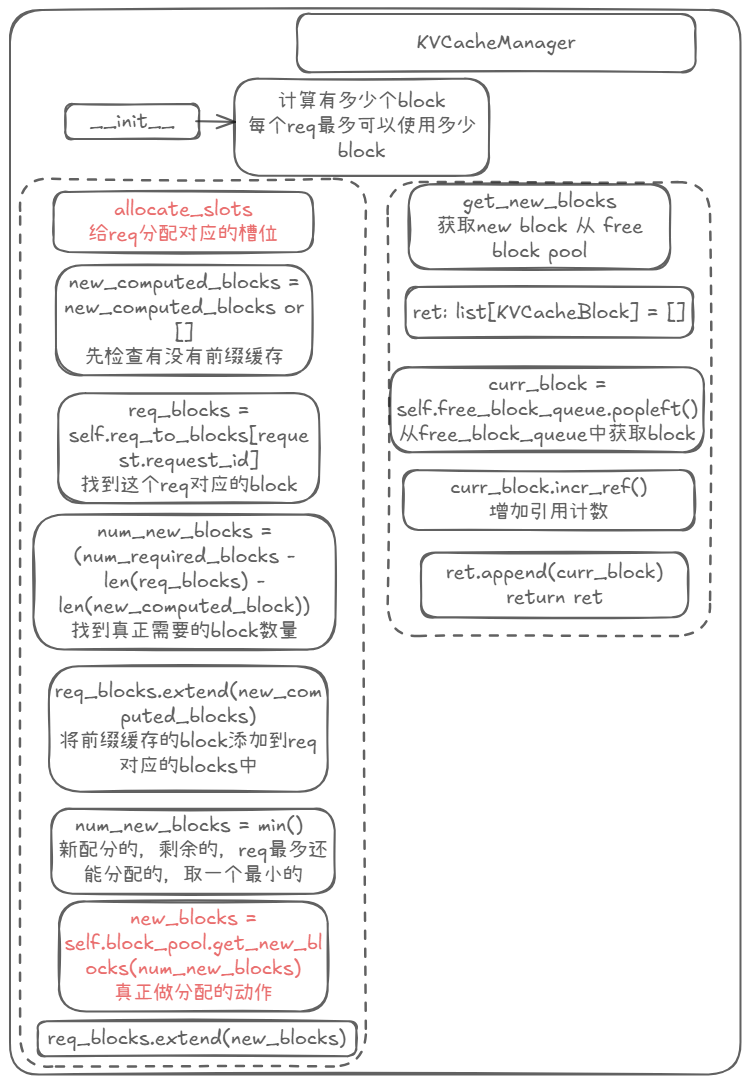
As shown in Figure 3, this section doesn’t yet follow the packed scheduler_output — instead we look closely at the block and block_table concepts.
The schedule() above uses an allocate_slots function, which is what allocates blocks for a request’s new tokens, then records them in the dict via req_blocks.extend(new_blocks). That’s the record of which block each request maps to! Internally it calls get_new_blocks to actually allocate blocks for the request.
There seems to be a gap here: this class is responsible for allocating blocks, but where the blocks actually come from is still unclear. So let’s dig further.
Files involved:
kv_cache_manager.py,block_pool.py
4. Where blocks come from: KV Cache initialization
In KVCacheManager.__init__ there’s a field:
self.num_gpu_blocks = kv_cache_config.num_blocks
This says how many blocks the GPU has. So where does this number come from?
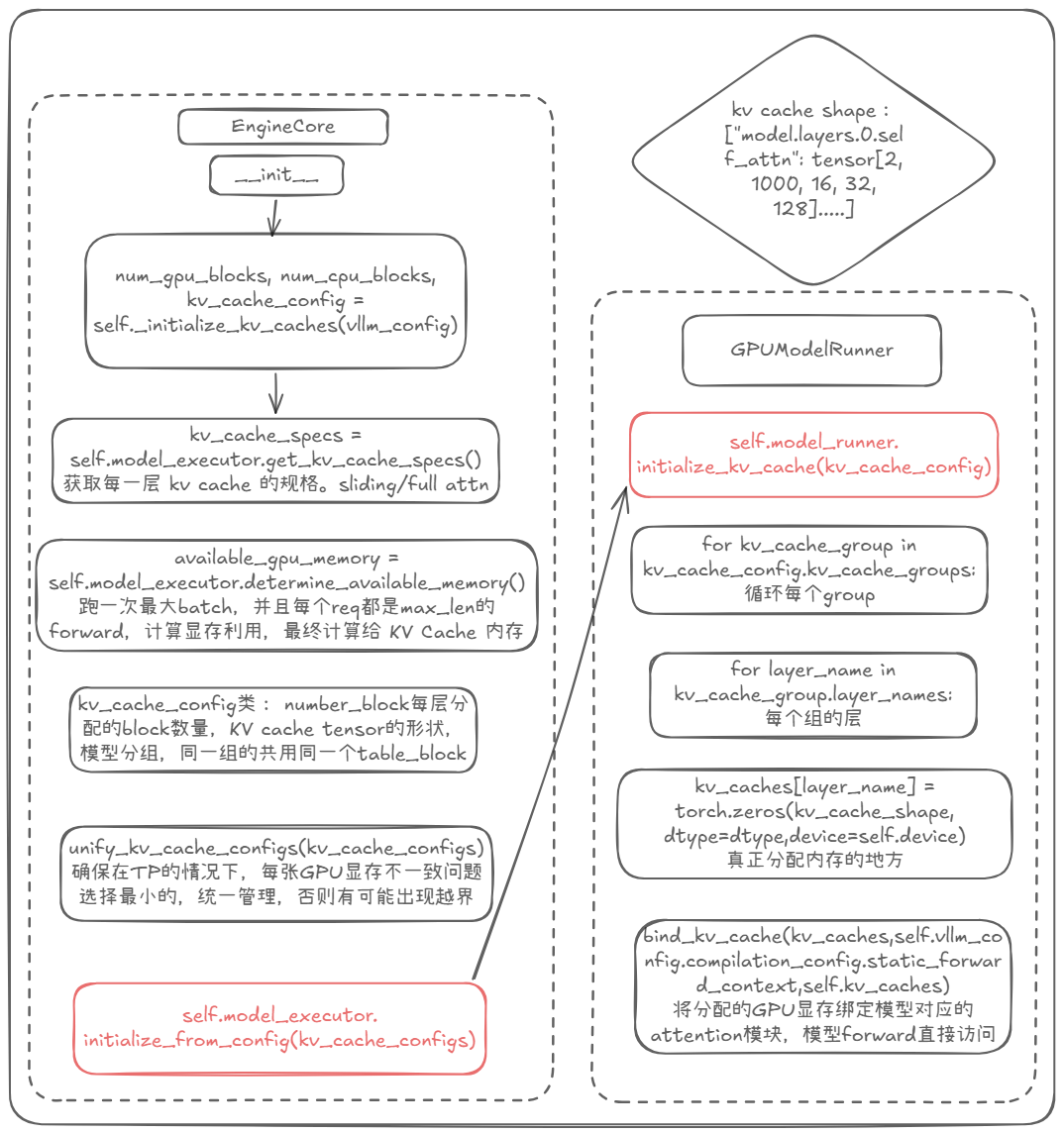
As shown in Figure 4, in EngineCore.__init__ we find an _initialize_kv_caches function. It first gets the attention spec for every model layer, kv_cache_specs (for example, whether a layer is full attention or sliding-window attention), then calls model_executor.determine_available_memory() to get the free GPU memory available for KV Cache, available_gpu_memory.
Using kv_cache_specs and available_gpu_memory, we then arrive at kv_cache_configs, which contains the number of blocks allocated per layer and the shape of the KV Cache tensors. This comes from _get_kv_cache_config_uniform_type — it reads the model’s layer count, computes the per-layer byte size, and groups the specs into kv_cache_groups. Finally it calls self.model_executor.initialize_from_config(kv_cache_configs), turning that KV Cache configuration description into actual GPU memory!
Inside that function:
kv_caches[layer_name] = torch.zeros(kv_cache_shape, dtype=dtype, device=self.device)
So all the per-layer attention memory is allocated up front, and afterwards we just read from and write to those addresses directly. At this point we know what num_gpu_blocks in KVCacheManager actually is.
How KVCacheManager manages blocks is actually fairly simple: it uses a BlockPool class, which has:
self.blocks: list[KVCacheBlock] = [KVCacheBlock(idx) for idx in range(num_gpu_blocks)]
Every block is a KVCacheBlock object, and a doubly linked list free_block_queue is built to manage them.
Files involved:
kv_cache_utils.py,kv_cache_manager.py,core.py,gpu_model_runner.py,gpu_worker.py,block_pool.py
5. How block_table and slot_mapping are used
We now know where blocks come from and how they’re managed — but how are they used? Let’s continue from scheduler_output.
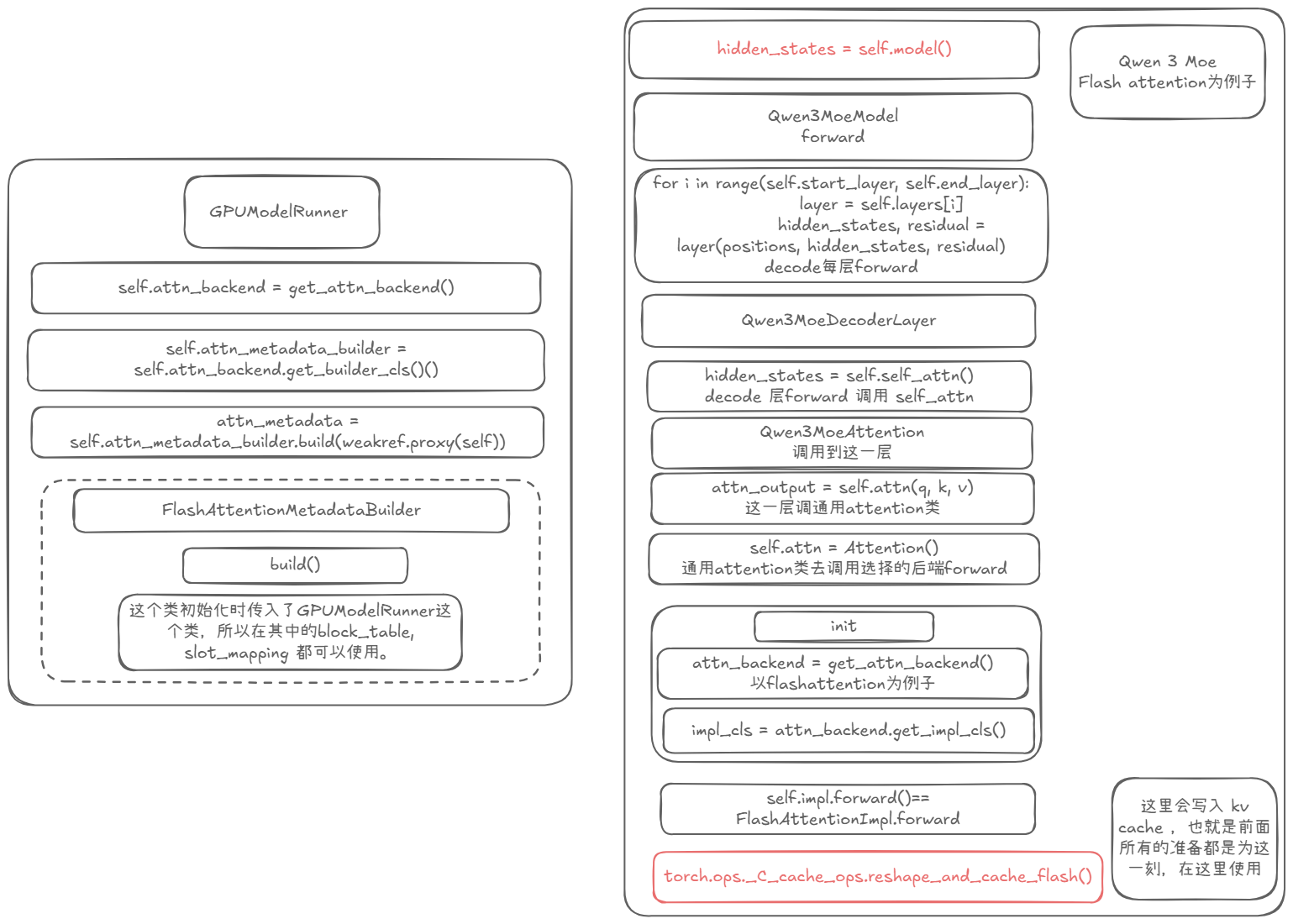
In Figure 1, model_executor.execute_model(scheduler_output) takes scheduler_output; following it, we end up at GPUModelRunner.execute_model(SchedulerOutput).
This involves the Worker / Executor concepts, which I won’t go into here. In a multi-machine, multi-GPU setup, I think of the “machine” as the Executor and each “GPU” as a Worker. Executor/Worker communication uses shared memory, one writer to many readers; inter-GPU communication uses NCCL with AllReduce for synchronization — this part I’m less familiar with.
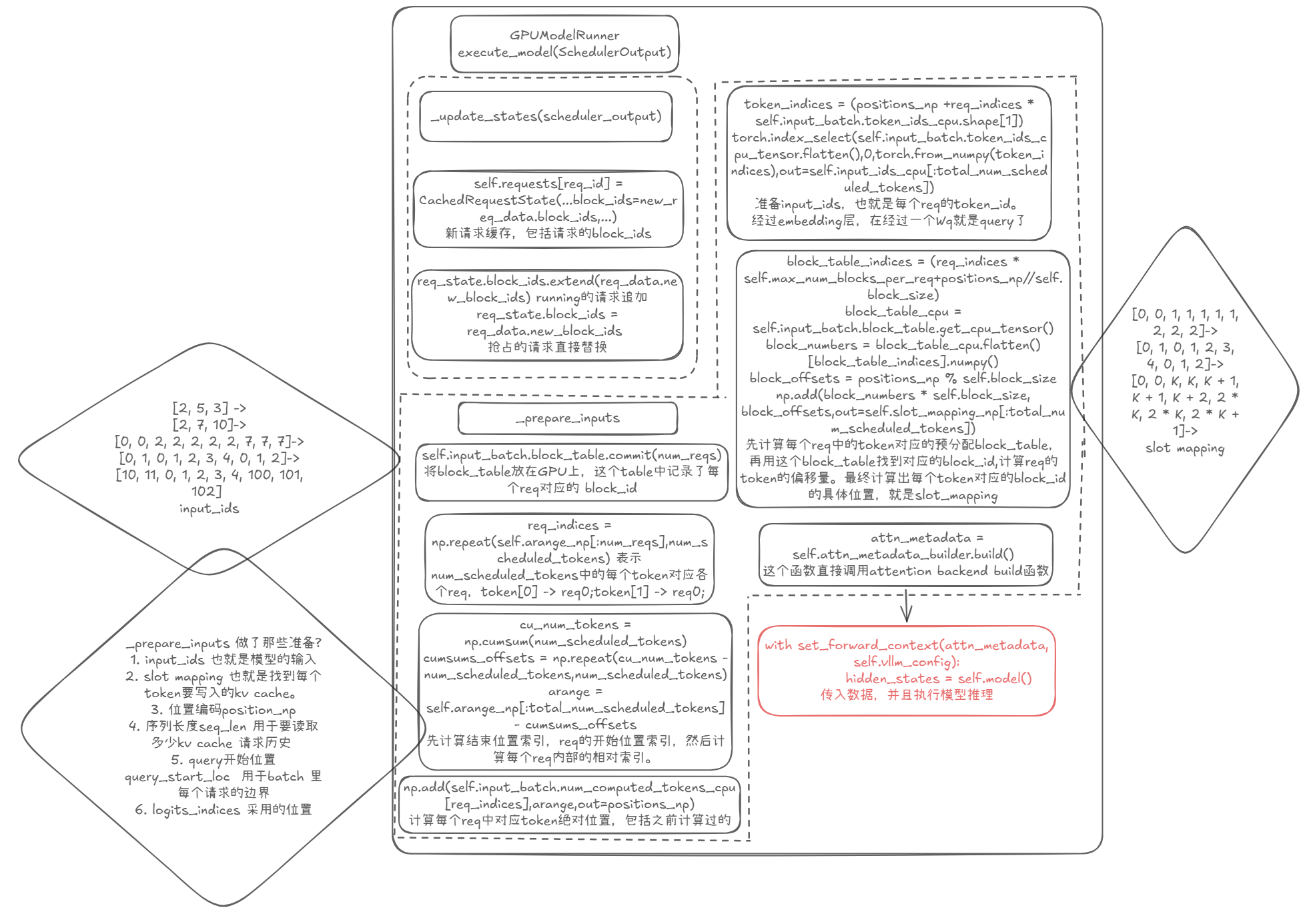
As shown in Figure 5, before the model actually runs forward there are two functions: _update_states and _prepare_inputs. These are conceptually simple but the logic is genuinely involved, especially _prepare_inputs.
For _update_states, the figure only covers the block_table part: it updates the block_table of these requests. That’s necessary because the requests scheduled in the current step may be completely different from the previous step — the same request may have gained blocks, or some requests may have been preempted, in which case their block_table looks nothing like the previous step’s.
For _prepare_inputs — the prep before calling forward:
First, input_ids — the queries for this step’s requests (which still need embedding and the Wq matmul). It needs to prepare each request’s position in the current step, the range each request occupies in input_ids, and the total sequence length seq_len (used to read the KV Cache).
Then slot_mapping — which block and which slot each token’s KV Cache should be written to. Let’s walk through an example:
Say the current step schedules 3 requests, [2, 5, 3]: the first request has 2 tokens, the second adds 5 new tokens, the third adds 3 new tokens. This becomes:
[0, 0, 1, 1, 1, 1, 1, 2, 2, 2]
representing 10 tokens, where 0 means req[0], 1 means req[1], and 2 means req[2]. Then it becomes:
[0, 1, 0, 1, 2, 3, 4, 0, 1, 2]
representing which token within the current step each position is. Assume each block_size = 2 (how much a block stores); then [0, 1] for a request fits in the same block. And since every request is pre-allocated max_num_blocks_per_req blocks (call it K), request 1’s 0, 1, 2, 3, 4 aren’t stored right next to request 0’s 0, 1 — there are K blocks between them:
[0, 0, K, K, K + 1, K + 1, K + 2, 2 * K, 2 * K, 2 * K + 1]
From there we know each token’s block_id. Next, using the absolute position we just computed, we work out the offset, so for each token we get block_numbers * block_size + block_offset — the exact address slot_mapping that token should be written to.
These values then go into an attn_metadata that is passed down to the model via a thread-local variable, and that’s how it gets used.
At this point we know how block_table is used and how slot_mapping is computed. But to go deeper — where exactly does the model use this data, and how does attention actually write to and read from it? — let’s look at how the model executes.
Files involved:
gpu_model_runner.py
6. Where attention actually uses block_table and slot_mapping
As shown in Figure 6: first, notice that the attn_metadata construction above doesn’t seem to pass in slot_mapping — so how does the model get it?
On the left of Figure 6, we see that during GPUModelRunner.__init__ it calls:
self.attn_backend = get_attn_backend()
self.attn_metadata_builder = self.attn_backend.get_builder_cls()(weakref.proxy(self))
The argument passes in self (the GPUModelRunner), which is why calling build earlier gives us access to data like block_table and slot_mapping.
Now, taking Qwen3 MoE Flash Attention as the backend example, here’s exactly where block_table and slot_mapping end up being used.
When Qwen3 MoE’s forward runs, it first calls each Qwen3MoeDecoderLayer’s forward, then reaches Qwen3MoeAttention’s:
attn_output = self.attn(q, k, v)
But self here is the Attention class, and Attention picks its backend in __init__, so the call becomes:
Attention's forward == self.impl.forward() == FlashAttentionImpl.forward
And inside flash attention’s forward we find:
torch.ops._C_cache_ops.reshape_and_cache_flash()
That’s the function that ultimately uses block_table and slot_mapping! Its source is written in CUDA.
Files involved:
gpu_model_runner.py,flash_attn.py,qwen3_moe.py,layer.py